
A private messenger hosted on your own computer. One subscription covers everyone you invite.
Set up privden on your home computer in just five minutes and chat with family and friends using mobile apps. Your computer hosts the server, keeping your chat history and shared files under your control rather than on a third-party messaging server. Messages and calls are protected by end-to-end encryption by default.
How it works
Step 1. Install privden on your computer.
Your computer becomes your private chat server — a home for your conversations and data.
Step 2. Get a client app.
Download a compatible messaging app from Google Play or the Apple App Store and connect it to your privden server using a QR code or invitation link.
Step 3. Start chatting.
Invite family, friends or colleagues. Everyone can chat with each other through your own privden server, wherever they are.
This is software, not a phone service. privden is an application you install on your own computer. It does not give you a phone number, a SIM or eSIM card, or charge you by the minute — it gives your family and friends a private place to talk, on your hardware.
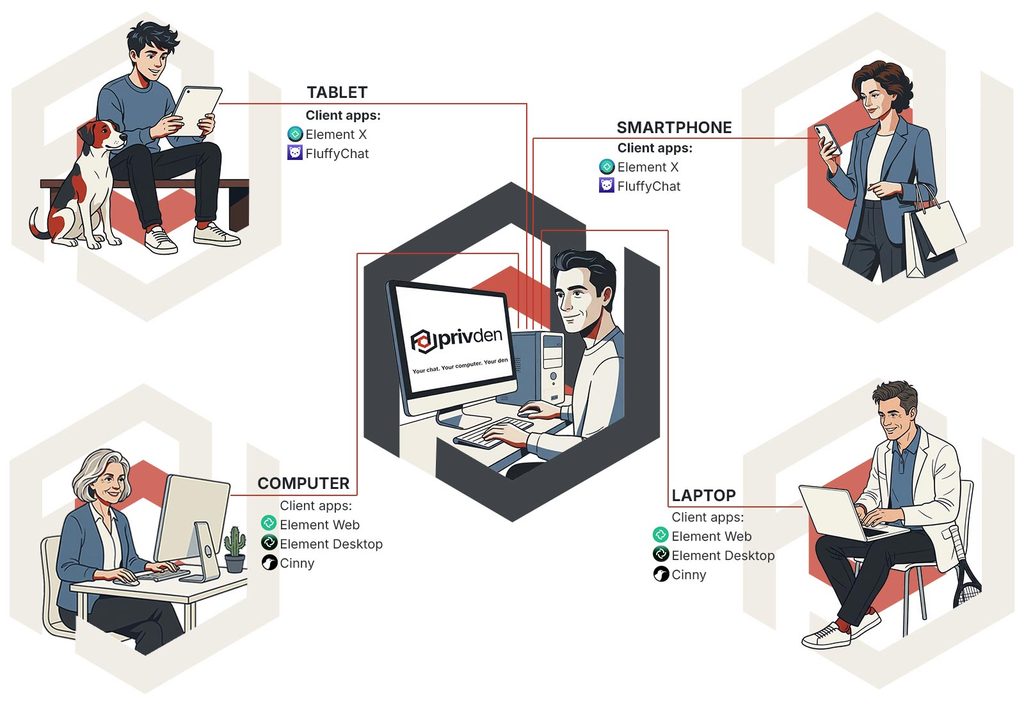
One private server. Everyone you invite
Your computer hosts your private chat space. Friends and family connect using compatible apps on their own devices.
Compatible mobile apps are available on the Apple App Store and Google Play
 | Element Web, Element Desktop | Windows, macOS, Web |
 | Cinny | Windows, macOS, Web |
 | Element X | iOS, Android |
 | FluffyChat | iOS, Android, Web |
Why choose privden over regular messengers?
- End-to-end encryption by default. Your messages and calls are protected with end-to-end encryption, so their content can only be accessed by the participants.
- Your data, your control. Your chat history and shared files are stored on your own server, not on a third-party messaging server.
- Connect from anywhere. Reach the people you invite over the internet, without relying on a third-party messaging provider.
- One subscription for everyone. Pay for your server, not for each person you invite. Everyone you invite can use compatible client apps for free.
- Easy to set up. No coding required. Install privden just like any other desktop app.
Who is it for?
Stay close, wherever you are.
Host your private messaging server on your home computer and stay connected with the people who matter. Enjoy private conversations without ads or dependence on a third-party messaging provider.
- Quick start: Set up your server in five minutes; family and friends simply download a compatible client app.
- Private archive: Your chat history, photos and videos are stored on your own server.
- Protected conversations: End-to-end encryption protects the content of your messages and calls by default.
Key benefits: No technical skills needed • Free for invited users • End-to-end encryption by default
Private team chat. No per-employee fees.
Host your team’s server on an office computer and manage who has access. Keep your business conversations and shared files under your organisation’s control.
- Business privacy: Store team chat history and shared files on your own server, rather than on a third-party messaging server.
- Protected communication: End-to-end encryption protects the content of messages and calls by default.
- Cost-effective: Pay for one server subscription, not for every employee. Staff use compatible client apps, and you can revoke access when someone leaves the team.
Key benefits: Your own server • No per-employee fees • End-to-end encryption
Your own server. No command-line hassle.
Run your own private messaging server on your home computer without manual port forwarding or complicated command-line setup.
- More control: Manage your own server and keep your chat history and shared files on your own hardware.
- End-to-end encryption: Messages and calls are protected by E2EE by default.
- Ready-to-use ecosystem: No need to build your own client apps. Compatible mobile apps are already available on the Apple App Store and Google Play.
Key benefits: Self-hosted server • E2EE by default • Compatible mobile apps • Open architecture